
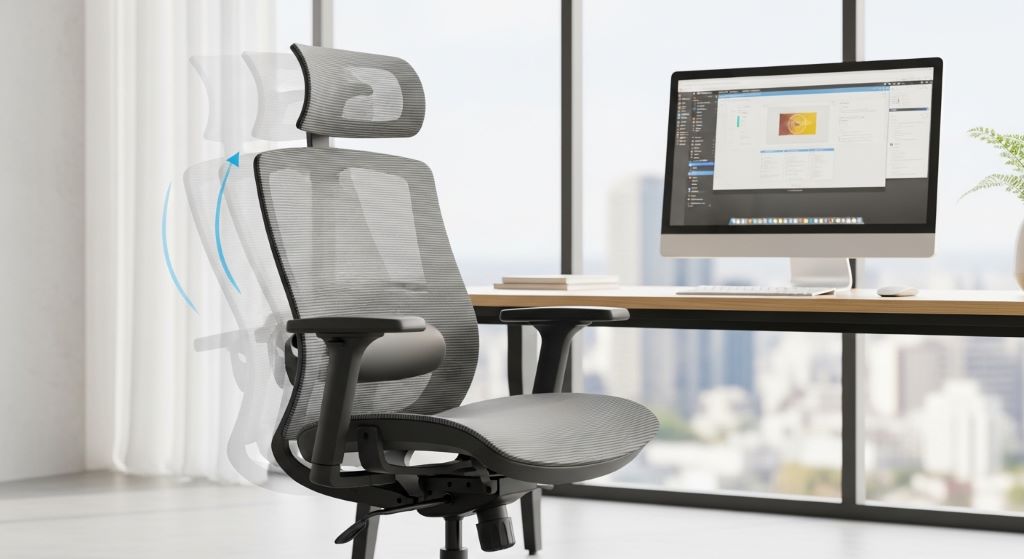
Your office chair affects far more than just your physical comfort. The way you sit and how your workspace supports your body directly impacts your ability to concentrate, maintain energy levels, and perform at your best throughout the workday. Many professionals struggle with afternoon fatigue and declining focus without realizing their chair setup is the culprit.
Creating an optimal seating arrangement isn’t complicated, but it does require attention to detail and understanding of how your body works. When you eliminate physical discomfort and strain, your mind is free to focus entirely on your tasks. This guide will show you exactly how to set up your chair to maximize productivity and enhance your performance.
The Connection Between Seating and Performance
Most people underestimate how much their physical environment affects their mental output. Discomfort creates constant low-level distraction that drains your mental resources. Even minor aches and pains pull your attention away from important tasks, reducing the quality of your work.
Research shows that employees experiencing physical discomfort take more frequent breaks and accomplish less during focused work sessions. Conversely, when your body feels supported and comfortable, you enter flow states more easily and maintain concentration for longer periods.
Additionally, poor seating affects your breathing. Slouching compresses your diaphragm, reducing oxygen intake. This decreased oxygen flow to your brain impairs cognitive function, making complex tasks more difficult and increasing mental fatigue.
Therefore, optimizing your chair setup is one of the most effective work efficiency tips you can implement immediately. The investment of time to adjust your seating properly pays dividends every single workday.
Setting Your Chair Height for Optimal Energy
Chair height is the foundation of proper seating. Getting this right affects everything else about your posture and comfort. Start by adjusting your seat so your feet rest flat on the floor with your knees bent at approximately 90 degrees.
Your thighs should be parallel to the ground or sloping slightly downward toward your knees. This position promotes healthy circulation to your legs and prevents the numbness and restlessness that come from restricted blood flow.
When your feet are properly supported, your core muscles engage naturally to maintain balance. This gentle engagement keeps you alert and prevents the slouching that leads to afternoon drowsiness. Many professionals notice improved afternoon energy simply by correcting their seat height.
If your desk is at a fixed height and achieving proper leg position raises you too high, use a keyboard tray to lower your work surface. Alternatively, a footrest can bring the floor up to meet your feet while maintaining proper desk height.
Mastering Lumbar Support Placement
The lumbar support feature in your chair serves a critical purpose for sustained productivity. Your lower back has a natural inward curve that needs support to prevent fatigue. Without proper support, your back muscles work constantly to maintain this curve, leading to exhaustion.
Position the lumbar support to fit into the small of your back, right at your belt line. You should feel gentle pressure that encourages your spine to maintain its natural S-curve. The support should feel present but not intrusive or uncomfortable.
Many people make the mistake of positioning lumbar support too high, which pushes the middle back forward and creates tension. Others set it too low, providing no benefit at all. Take time to experiment with the adjustment until you find the sweet spot.
Proper lumbar support allows you to sit back fully in your chair while maintaining good posture. This relaxed yet supported position reduces muscle tension and lets you work comfortably for extended periods without strain.
Armrest Adjustment for Reduced Tension
Correctly positioned armrests dramatically reduce shoulder and neck tension that builds throughout the day. However, improperly adjusted armrests can actually create problems rather than solving them.
Your armrests should support your forearms when your shoulders are relaxed and your elbows are bent at roughly 90 degrees. This position allows your shoulders to drop naturally rather than hunching upward. The support should be there when you need it but shouldn’t force your arms into an unnatural position.
Many productivity losses come from upper body tension that develops gradually. Tight shoulders restrict breathing, create headaches, and make typing or mouse work physically tiring. Proper armrest height prevents this tension from building in the first place.
If your armrests interfere with getting close to your desk, adjust them lower or remove them entirely. Being too far from your work surface causes you to reach forward constantly, which negates any benefit the armrests might provide.
Seat Depth and Its Impact on Concentration
Seat depth is frequently overlooked but significantly affects your ability to maintain focus. The right depth allows you to sit back against the lumbar support while maintaining a few inches of space between the seat edge and the back of your knees.
When the seat is too deep, you cannot reach the backrest without pressure behind your knees, which restricts circulation. When it is too shallow, your thighs lack support, causing you to shift positions frequently and breaking your concentration.
Frequent position changes indicate discomfort and represent micro-interruptions to your workflow. Each time you shift, you lose a bit of focus. Over the course of a day, these small interruptions add up to significant productivity losses.
Many modern chairs offer adjustable seat depth. If yours does not, consider adding a lumbar cushion to effectively shorten the seat depth. This simple addition can transform an ill-fitting chair into a comfortable workstation.

Monitor and Keyboard Positioning for Flow
While not technically part of your chair, your monitor and keyboard positions work together with your seating to create an integrated workspace. These elements must align properly to support sustained productive work.
Position your monitor so the top of the screen sits at or slightly below eye level. This prevents neck strain from looking up or down for hours. The monitor should be about an arm’s length away, allowing you to read comfortably without leaning forward.
Your keyboard should be close enough that you can type with your elbows near your sides and your forearms parallel to the floor. Reaching forward to type creates shoulder tension and pulls you out of your optimal seated position.
When everything aligns correctly, you can work in a neutral, relaxed posture that feels effortless. This alignment is essential for entering and maintaining the focused mental state that characterizes peak productivity.
Creating Movement Within Your Seated Position
Even perfect static posture becomes problematic over time. Your body needs regular movement to stay comfortable and alert. However, you can incorporate micro-movements without leaving your chair or interrupting your work.
Small adjustments like shifting your weight from one hip to the other, doing seated shoulder rolls, or rotating your ankles keep blood flowing and prevent stiffness. These movements take seconds and can be done while reading, thinking, or during natural work pauses.
Consider setting a gentle reminder to check in with your body every 30 minutes. This brief awareness moment helps you notice developing tension before it becomes distracting pain. Simple stretches or posture corrections made early prevent the larger discomfort that forces extended breaks.
Additionally, alternating between sitting slightly forward and sitting fully back against your lumbar support provides variation while maintaining good posture. This alternation engages different muscle groups and prevents fatigue from sustained static positions.
Temperature and Material Considerations
The materials your chair is made from affect your comfort in ways that directly impact productivity. Mesh backs promote airflow and prevent the overheating that leads to discomfort and drowsiness during long work sessions.
Fabric seats can trap heat and moisture, creating discomfort that becomes increasingly distracting as the day progresses. Leather or faux leather may feel premium but can also contribute to temperature discomfort depending on your environment.
Consider your office temperature and personal tendencies when selecting or evaluating your chair. If you tend to run warm, prioritize breathable materials. If your office runs cold, cushioned fabric might provide welcome comfort.
Temperature regulation might seem minor, but thermal discomfort is surprisingly distracting. Maintaining a comfortable body temperature allows your mind to focus fully on your work rather than physical sensations.
Personalizing Your Setup for Maximum Results
Every body is different, and cookie-cutter advice only goes so far. Pay attention to your individual responses and adjust accordingly. Some people prefer firmer support, while others work best with softer cushioning.
Keep a simple journal for a week, noting how you feel at different times of day and any discomfort you experience. Patterns will emerge that guide your adjustments. Perhaps you notice afternoon shoulder tension, suggesting your armrests need lowering. Maybe morning lower back stiffness indicates your lumbar support needs repositioning.
Your comfort needs may change with different tasks. Deep focus work might benefit from a slightly different position than collaborative video calls. Allow yourself to make minor adjustments throughout the day as needed.
The goal is finding your personal optimal setup, not matching some theoretical ideal. Trust your body’s feedback and continuously refine your arrangement.
The Psychology of Environmental Control
Having control over your physical environment provides psychological benefits beyond mere comfort. When you actively optimize your workspace, you signal to yourself that your work matters and deserves proper conditions.
This sense of agency and self-care translates into improved motivation and engagement with your tasks. Conversely, tolerating discomfort day after day can create subtle resentment and disengagement that undermines performance.
Taking time to perfect your setup demonstrates respect for your own wellbeing and productivity. This mindset shift often catalyzes other positive changes in how you approach your work.
Moreover, a properly configured workspace reduces decision fatigue. When your environment consistently supports you, you are not constantly making micro-decisions about shifting position or managing discomfort. This preserved mental energy is available for actual work.
Maintaining Your Setup Over Time
Your perfect setup today may not remain perfect as your chair ages or your work changes. Regularly reassess and readjust to maintain optimal support.
Check adjustment mechanisms monthly to ensure they are still holding positions correctly. Gas lift cylinders can wear out, causing gradual height loss throughout the day. Lumbar supports can compress or shift. Identifying these issues early prevents gradual comfort decline.
Clean and maintain your chair according to manufacturer recommendations. Accumulated dirt and debris can interfere with adjustment mechanisms. Regular maintenance extends your chair’s life and ensures consistent performance.
As your fitness level, weight, or health status changes, your seating needs may shift. Remain open to reevaluating your setup whenever you notice persistent discomfort or declining afternoon energy.
Integrating Chair Setup with Other Business Performance Strategies
Your chair setup works synergistically with other productivity strategies. When combined with proper time management, focused work blocks, and regular breaks, optimal seating amplifies your results.
Consider your chair adjustment part of your morning routine, just like reviewing your schedule or prioritizing tasks. This daily check-in ensures you are starting from an optimal position and reinforces the importance of your physical environment.
Document your ideal settings if your chair has multiple adjustments. This reference point helps you quickly reset after someone else uses your workspace or if adjustments shift accidentally. Consistency in your setup supports consistency in your performance.
Remember that office comfort hacks like proper seating complement rather than replace other productivity strategies. However, they provide the physical foundation that makes other techniques more effective.
Conclusion
Improving productivity through proper office chair setup is one of the most accessible and impactful changes you can make to your work environment. By carefully adjusting seat height, lumbar support, armrests, and seat depth, you create physical conditions that support sustained focus and energy throughout your workday.
The connection between physical comfort and mental performance is undeniable. When your body feels supported and relaxed, your mind is free to engage fully with challenging tasks. Small adjustments to your seating position can eliminate the low-level discomfort that drains your energy and fragments your attention.
Remember that finding your optimal setup is a personal process requiring attention and experimentation. Use these work efficiency tips as starting points, then refine based on your body’s feedback. Regular reassessment and maintenance ensure your setup continues supporting your business performance over time.
Investing time in perfecting your chair arrangement demonstrates commitment to both your wellbeing and your professional success. This simple change creates compounding benefits that enhance every aspect of your workday, making it one of the most valuable productivity improvements you can implement.
Frequently Asked Questions
How long does it take to adjust to a new chair setup?
Most people adapt to improved chair positioning within three to five days. You might experience slight muscle soreness initially as your body adjusts to supporting itself differently. This temporary discomfort indicates your muscles are learning to work in healthier patterns. Give yourself at least two weeks before deciding whether adjustments are working, as benefits become more apparent over time.
Should I adjust my chair differently for different tasks?
Minor adjustments for varying tasks can be beneficial. For example, you might sit slightly more upright for video calls and recline a bit more when reading documents. However, major position changes are unnecessary. The key is finding a neutral position that works well for most activities, then making only small tweaks as needed for specific situations.
Can a good chair setup really improve my productivity?
Yes, research consistently shows that physical comfort directly impacts cognitive performance and work output. Eliminating pain and discomfort removes distractions that fragment attention. Additionally, proper posture improves breathing and circulation, which enhances alertness and mental clarity. Many professionals report noticeable improvements in afternoon energy and focus after optimizing their seating.
What should I do if my chair lacks adjustment features?
Use accessories to customize a non-adjustable chair. Lumbar cushions add lower back support, seat cushions can adjust effective height, and footrests compensate for chairs that sit too high. While not ideal, these additions can significantly improve a basic chair. However, if you spend many hours at your desk daily, investing in an adjustable chair is worthwhile for long-term health and productivity.
How often should I stand up even with a perfect chair setup?
Stand and move at least every 45 to 60 minutes regardless of how comfortable your chair is. Your body needs movement to maintain circulation and prevent stiffness. Use these breaks for simple tasks like filing, making coffee, or quick stretches. These movement breaks actually enhance overall productivity by preventing the fatigue that comes from prolonged static positioning.
Related Topics:
Automating Client Onboarding with Zapier and Calendly
Crafting a Successful Business Plan for a Mobile Repair Workshop