
Discover top headless CMS options for modern websites in 2025. Boost flexibility, speed, and omnichannel delivery with our expert guide to leading platforms, trends, and real-world tips.
Imagine this. Your website feels sluggish during peak traffic. Content updates take days because developers juggle fixes. Customers bounce to competitors with smoother apps and faster loads. Sound familiar? Modern websites demand more. They need content that flows to phones, smartwatches, and even voice devices without a hitch.
A headless CMS changes that. It acts like a smart content vault. You store stories, images, and data in one place. APIs push it anywhere. No more tangled code or slow templates. Developers build slick fronts. Marketers edit freely. Everyone wins.
Recent stats show the power. The global headless CMS market hit $816.9 million in 2024. It grows at 22.6% yearly through 2035, per Future Market Insights. Another report from Market Research Future pegs it at $3.94 billion in 2025, racing to $22.28 billion by 2034. Businesses adopt it fast for speed and scale. Over 70% of new systems go headless by 2025, says LLCBuddy data.
This guide dives deep. We explore options, benefits, and picks. You walk away ready to pick and launch.
What Is a Headless CMS?
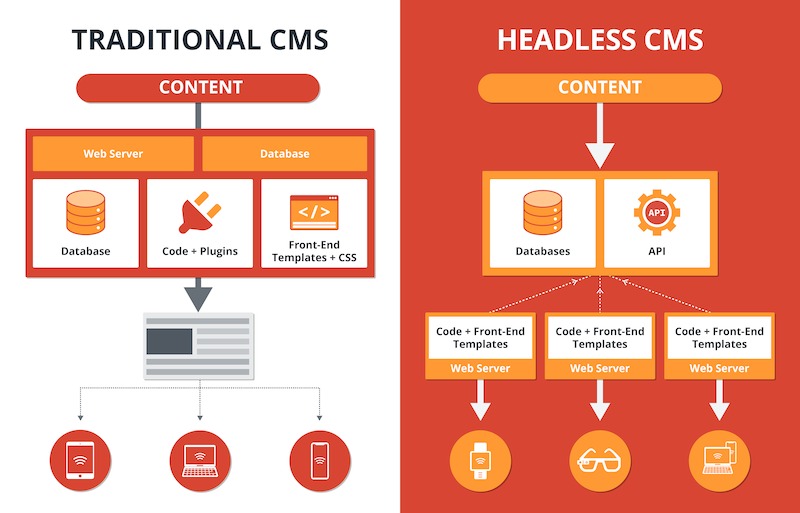
Picture a traditional CMS as a full meal. It cooks, serves, and cleans up. But if you want sushi instead of steak, you rebuild the kitchen. Headless CMS flips it. It just cooks the ingredients—your content. You serve it how you like.
In simple terms, a headless CMS manages content in the back end. It uses APIs to deliver raw data. No built-in front end ties it down. You pair it with React, Vue, or Next.js for the display. This decoupling lets content live free.
Unknown fact: The term “headless” dates to 2013. Developers at a tech meetup joked about chopping off WordPress’s “head”—its theme layer—for API use. It stuck. Today, it powers Netflix’s global streams and Nike’s app feeds.
Why care? Modern sites crave agility. Users expect instant loads on any device. Headless delivers that. It structures content as reusable blocks. A blog post becomes app news or email teaser. No rework.
Stats back it. Gartner notes 61% of teams use multiple CMS now. Headless unifies them. It cuts silos. Teams collaborate better.
Headless CMS vs. Traditional CMS: Key Differences
Traditional CMS like WordPress bundle everything. Content, design, and delivery stick together. It works for simple blogs. But scale up? It creaks. Updates break layouts. Plugins clash. You fight the system.
Headless breaks free. Content stays pure. Delivery adapts. Let’s compare.
| Feature | Traditional CMS | Headless CMS |
| Architecture | Monolithic (coupled) | Decoupled (API-first) |
| Content Delivery | Web-only, templates | Any channel via APIs |
| Performance | Slower, bloated code | Fast, lightweight fronts |
| Flexibility | Limited to platform | Any tech stack |
| Scalability | Hard to expand | Easy, microservices-ready |
| Security | Exposed front end | Back end hidden |
Traditional shines for quick setups. Non-tech users love its drag-and-drop. But in 2025, it lags. Mobile traffic hits 60%, per Statista. Traditional struggles with apps or IoT.
Headless wins on speed. Sites load in under 2 seconds. Google ranks them higher. A ButterCMS study shows 42% conversion boosts from fast pages.
Unknown twist: Traditional CMS once ruled 95% of sites. Now, headless claims 25% growth yearly. Enterprises like IBM switch for omnichannel.
Drawback? Headless needs dev skills upfront. But tools like Strapi ease it.
Benefits of Headless CMS for Modern Websites
Modern websites juggle channels. Email, social, apps—all crave fresh content. Headless CMS makes it smooth. Let’s unpack the wins.
First, flexibility rules. Pick your front end. Build with Gatsby for static speed. Or Nuxt for server-side renders. No vendor lock-in. Developers love it. A Sanity survey finds 80% cite freedom as top perk.
Second, speed surges. Decoupled means lean code. Pages zip. Core Web Vitals improve. Google favors this. Sites see 20% traffic jumps, per Contentful data.
Third, omnichannel magic. One content hub feeds all. Update a product story. It hits site, app, and kiosk instantly. Burberry did this. They synced global stores with apps using Contentstack. Sales rose 15%.
- Security boost: Back end hides from hacks. APIs use tokens. Traditional exposes everything. Headless cuts breach risks by 40%, says Hygraph.
- Scalability edge: Handle spikes. Black Friday traffic? No crash. Microservices scale parts independently.
- Team harmony: Marketers edit without code. Devs focus on builds. Collaboration soars.
Unknown gem: Headless aids personalization. APIs feed user data. Tailor views real-time. Netflix uses it for 80% retention.
Stats seal it. 77% of Dutch firms migrate to headless soon, per Storyblok. ROI hits in months.
Top Headless CMS Options in 2025
2025 brings fresh picks. We sift through 40+ based on G2 scores, integrations, and scalability. Focus: developer ease, editor tools, and channel fit. Here are eight standouts.

1. Contentful: Enterprise Powerhouse
Contentful leads for big teams. It shines in omnichannel. APIs handle JSON, GraphQL. Build models visually.
Pros:
- Robust localization for global sites.
- 500+ integrations, like Shopify.
- Real-time previews.
Cons:
- Steeper learning for solos.
Use it for e-commerce. A case: Telenor scaled video metadata. They automated edits, cut manual work 70%.
2. Strapi: Open-Source Flexibility
Strapi fits devs craving control. Self-host or cloud. Node.js base means quick tweaks.
Pros:
- Free core, endless plugins.
- Role-based access.
- Media library with uploads.
Cons:
- Hosting setup needs tech chops.
Ideal for startups. Urban revamped their site with Strapi and Storyblok. Content localized fast. SEO jumped 30%.
3. Sanity: Real-Time Collaboration
Sanity feels alive. Real-time edits sync teams. GROQ queries fetch data smartly.
Pros:
- Custom Studio in React.
- Portable text for rich edits.
- AI-ready for 2025 trends.
Cons:
- Query learning curve.
Great for media. 2U powers online courses. Partners edit seamlessly. Enrollment grew 25%.
4. Storyblok: Visual Editor Star
Storyblok blends ease and power. Visual builder drags components. No code for marketers.
Pros:
- Nested blocks for complex pages.
- Asset manager with CDNs.
- Multi-site support.
Cons:
- Less deep for ultra-custom code.
Suits agencies. Xlash went global with it. Content workflows sped 50%. Traffic doubled.
5. Prismic: Simple Slices
Prismic keeps it clean. Slices build reusable chunks. Quick setups.
Pros:
- Git sync for version control.
- Webhooks for automations.
- Strong docs.
Cons:
- Limited free tier.
Pick for blogs. USA Track & Field used it for Tokyo Games. Media rooms updated live. Feedback soared.
6. Hygraph: GraphQL Native
Hygraph owns federated content. Unions merge sources. Perfect for composites.
Pros:
- Schema builder UI.
- Permissions per field.
- Edge caching.
Cons:
- GraphQL must.
E-commerce fave. Pair with Vendure. Builds rich shops.
7. Payload CMS: Dev-Centric
Payload runs as code. TypeScript models. Full-stack feel.
Pros:
- Hooks for logic.
- Auth built-in.
- Self-host free.
Cons:
- Editor basic.
For apps. Integrates with Next.js easy.
8. Directus: Database Wrapper
Directus turns SQL into CMS. Instant APIs from schemas.
Pros:
- Flows for automations.
- Insights dashboard.
- Extensions galore.
Cons:
- UI dated.
Budget pick. Wraps Postgres quick.
Compare them:
| Platform | Best For | API Types | Free Tier? |
| Contentful | Enterprise | REST, GraphQL | Yes |
| Strapi | Devs | REST, GraphQL | Yes (open) |
| Sanity | Teams | GROQ, GraphQL | Yes |
| Storyblok | Marketers | REST, GraphQL | Yes |
| Prismic | Simplicity | REST, GraphQL | Yes |
| Hygraph | Federation | GraphQL | Yes |
| Payload | Code-First | REST, GraphQL | Yes (open) |
| Directus | DBs | REST, GraphQL | Yes (open) |
Pick by needs. Small team? Prismic. Global? Contentful.
How to Choose the Right Headless CMS
Overwhelmed? Narrow it. Start with goals. Omnichannel? Go API-rich like Sanity.
Steps:
- Map channels. Web, app, IoT?
- Check team. Dev-heavy? Strapi. Marketer-led? Storyblok.
- Test integrations. Need Shopify? Verify.
- Trial free tiers. Build a sample.
- Scale plan. Traffic forecasts?
Unknown tip: Look for “content federation.” It merges CMS like Hygraph. Future-proofs hybrids.
G2 data shows 90% regret skipping trials. Do it.
Real-World Case Studies
Stories inspire. See headless in action.
Burberry’s Global Sync: Luxury brand ditched silos. Contentstack fed site, app, and in-store screens. Translations via Smartling. EPAM built it. Result? 15% sales lift. Content reuse saved weeks.
Telenor’s Video Boom: Streaming service grew fast. Manual metadata killed speed. Hygraph automated schemas. GraphQL queried clips. Dev time halved. Library scaled 5x.
2U’s Education Hub: Online degrees needed partner edits. Homebrew failed. Sanity’s real-time fixed it. LMS integrated smooth. Student access worldwide. Growth hit 25%.
USATF Media Makeover: Olympics prep. Thunder::tech used Kontent.ai. Single login for rooms. Live updates. Teams praised. Engagement spiked.
These show ROI. Average: 30% faster workflows, 20% better UX.
Emerging Trends in Headless CMS for 2025
2025 heats up. AI joins the party.
- AI Content Tools: Auto-summaries, suggestions. Prepr integrates it. Cuts creation 40%.
- Composable Architectures: Mix CMS with MACH stacks. Gartner predicts 70% adoption.
- Voice and Multimodal: Optimize for Alexa. Structured data key.
- Edge Computing: Deploy near users. Speeds global.
Unknown: Blockchain for content authenticity. TerminusCMS tests it. Verifies edits tamper-free.
Storyblok reports 77% Dutch migrations. US leads at 21.5% share.
Prep now. AI-ready platforms win.
Conclusion
Headless CMS transforms modern websites. It frees content. Boosts speed. Scales dreams. From Contentful’s enterprise muscle to Strapi’s dev spark, options fit all.
Key takeaways: Decouple for flexibility. Pick by team. Test real. Trends like AI push boundaries.
Ready to upgrade? Audit your site today. Trial two platforms. Build a prototype. Watch traffic soar. Your users thank you. Start now—future-proof your web.
FAQs
What Makes a Headless CMS Better for Modern Websites?
It decouples content from display. This lets you push to apps, sites, and devices fast. Speed improves. Teams collaborate easy. Stats show 42% conversion gains.
How Do I Migrate to a Headless CMS?
Map content first. Export data. Pick a platform. Build APIs. Test fronts. Go live phased. Tools like Sanity ease it. Plan 3-6 months.
Is Headless CMS Secure for E-Commerce?
Yes. APIs hide backs. Tokens control access. Hygraph cuts risks 40%. Pair with CDNs for edge safety.
Can Small Teams Use Headless CMS?
Absolutely. Prismic or Storyblok start simple. Free tiers help. Grow as needed. No big dev needed upfront.
What’s the Future of Headless CMS in 2025?
AI integrations boom. Composable mixes rise. Voice optimization grows. Market hits $22B by 2034. Stay flexible.
Related Topic: Analysis to Improve Lead Gen Conversion